
Who this is for: practice managers
You can invite surgeons to your clinic's Alivra account. The Alivra team checks each invite before the surgeon can sign in. Alivra physios are part of the Alivra team, so you don't need to invite them.
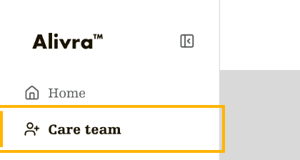
Step one: open your care team
- In the menu on the left, select Care team.
- The page opens on the Surgeons tab. It lists your surgeons and any invites waiting for approval.
Step two: fill in the invite
- Select Invite surgeon. The invite form opens.
- Fill in every field: Email, AHPRA, First name, Last name, Speciality and Location.
Step three: send it for approval
- Select Queue for approval. It stays greyed out until every field is filled in. Hover over it to see which fields are missing.
- A message confirms the invite is queued. The Alivra team checks the surgeon's registration on the AHPRA public register, then emails them their sign-in details.
The invite shows as Pending in your list until it's approved, then as Active.
Cancel an invite or remove a surgeon
- Pending invite: select Cancel invite on its row, then Cancel invite again to confirm.
- Surgeon who has left: select Remove on their row, then confirm.
Practice managers
The Practice managers tab shows who manages your clinic's account. To add or remove a practice manager, contact the Alivra team.
That's it. Once approved, your surgeon gets an email to sign in for the first time.