
Who this is for: surgeons and nurses
Find your patient and select their name. Their progress page opens.
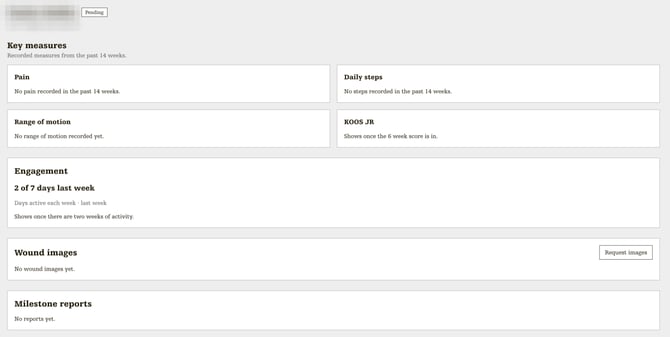
At the top
- Status: Pending, Active, Completed or Opted out.
- Summary line: age, sex, side and operation, and where they're up to, for example "6W post-op". Hover over it to read it in full.
Key measures
The last 14 weeks of what your patient has recorded in the app.
- Pain: average over the last 2 weeks, on a 0 to 10 scale (lower is better), with a weekly chart.
- Daily steps: average over the last 2 weeks, with a weekly chart.
- Range of motion: the latest flexion and extension in degrees, and when they were captured.
- KOOS JR or HOOS JR: joint score out of 100 (higher is better), before surgery, then about 6 weeks after.
If a card is empty, your patient hasn't recorded that measure yet.

Engagement
How many days your patient used the app last week, for example "5 of 7 days last week", with a chart of days active each week.
Wound images
Photos your patient has sent of their wound. Select a photo to see it larger.
To ask for a new photo:
- Select Request images.
- Add a note for the patient if you like, then select Send request.
- Your patient gets a message asking for a photo. The photo appears here when they send it. They're only asked once a day.

Milestone reports
Reports from your patient's Alivra physio at key points in their recovery. Select Download next to a report, or Download all.

Extra for nurses
Nurses see three more things on a patient's progress page:
- Phone: the patient's mobile number. Select it to call them.
- Notes: add notes about the patient. The Alivra physios can read your notes, and you can read theirs.
- Mark reviewed: new wound images wait for a review. Select Mark reviewed once you've checked one.
Nurses can't message patients.