
Who this is for: surgeons and nurses
Your Home page sums up your Alivra patients and lists every patient you've referred. Nurses see every patient in the clinic, across all its surgeons.
Your home page at a glance
- Alivra activations: how many of your referred patients signed up. Choose 3, 6 or 12 months to change the period.
- Patient journey: where your patients are up to. Select a part of the chart to show only those patients in the list below.
- Alivra referrals: your patients by status: Pending, Active and Completed. Select one to filter the list.
A filter you've picked shows above the list. Select its × to clear it.

Clinical alerts
Clinical alerts lists patients who've reported severe pain (7 or more out of 10), with how long ago, their pain score, the severity and their responsible physio. Select Dismiss once you've seen an alert, and View all to see more. Nurses see moderate pain alerts as well as severe ones.

Find a patient
Your patients are listed under Patients on your Home page. You can also select Patients in the menu on the left.
- Choose the Surgical or Non-surgical tab. Each shows how many patients it holds.
- Type in Search by name, or pick a joint from the Joint drop-down.
- On the Surgical tab, use Weeks after surgery to show patients at a certain point, for example week 6.

Patients by stage
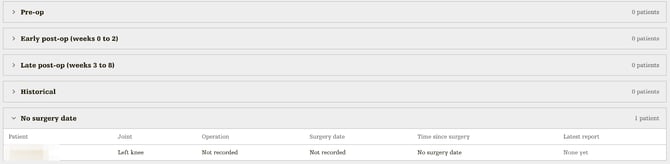
Surgical patients are grouped by stage: Pre-op, Early post-op (weeks 0 to 2), Late post-op (weeks 3 to 8), Historical and No surgery date. Each group starts closed and shows how many patients it holds. Select a group to open it.
Each row shows the patient's joint, operation, surgery date, time since surgery (for example "Week 6" or "Surgery in 2 weeks") and their latest report. Select Report to jump straight to it.
Select a patient's name to open their progress. See View a patient's progress.