
Who this is for: practice managers
Your Home page is your referral tracker. It lists every patient your clinic has referred to Alivra.
Your referrals at a glance
Three cards at the top count your patients by status. Select a card to show only those patients, and select it again to clear the filter. Hover over a card to see what it counts.

- Pending referrals: referred, and hasn't yet accepted or declined the Alivra program.
- Active Alivra patients: has an upcoming Alivra physio appointment, or has signed up and is within 6 weeks of surgery.
- Completed Alivra patients: finished the active program with no physio appointments coming up, or withdrew before 6 weeks after surgery. They can still use the Alivra app.
A patient who declined the program shows as Opted out.
Find a patient in the list
Above the list you can:
- type in Search by patient name
- pick a surgeon from All surgeons
- pick a status: All, Pending, Active, Completed or Opted out

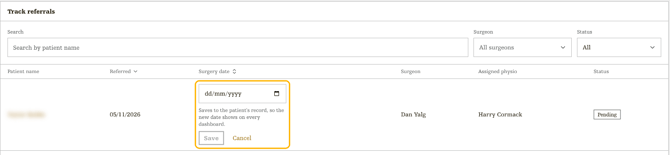
The list shows each patient's Patient name, Referred date, Surgery date, Surgeon, Assigned physio and Status. Select Referred or Surgery date to sort by it. Use Rows per page, Previous and Next to move through a long list.
Update a surgery date
- Hover over the patient's surgery date and select the calendar icon.
- Pick the new date and select Save.
- Surgery date saved. confirms the change.
Keeping surgery dates up to date matters: the patient's program is timed around them.
Open a patient's referral
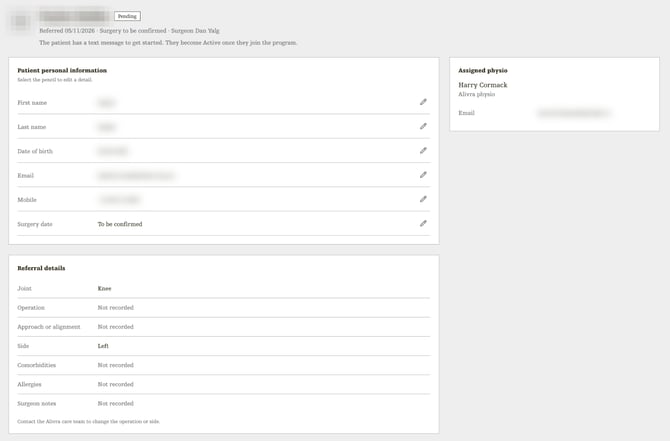
Select a patient's name to open their referral. It has three parts:
- Patient personal information: first name, last name, date of birth, email, mobile and surgery date. Select the pencil next to a detail to change it, then Save. Changing the mobile number changes the number the patient uses to sign in to the Alivra app.
- Referral details: what was sent with the referral, such as the joint, operation and side. These can't be changed here.
- Assigned physio: the Alivra physio looking after this patient.
Make a new referral
Select New referral at the top right. See Refer a new patient.
Reports: milestone reports go to the patient's surgeon. They aren't shown on the practice manager dashboard.